Core Web Vitals: what to measure before redesigning your site
Three metrics decide whether your site feels fast or maddening. Here are LCP, INP and CLS in plain English, and what to measure before paying for a redesign.
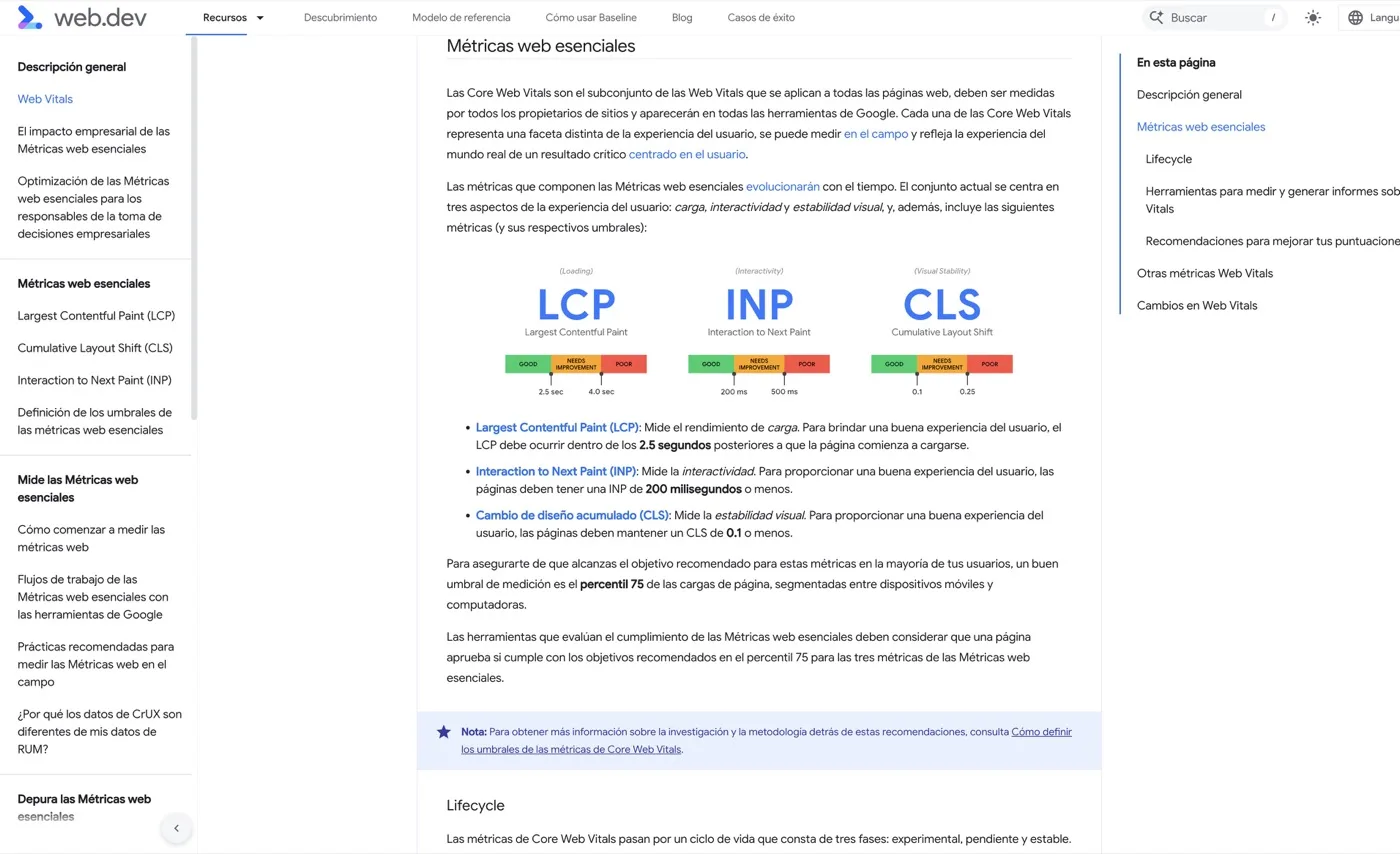
Before redesigning a website it pays to know exactly what is wrong, because “it’s slow” is not a diagnosis. Google publishes three metrics, the Core Web Vitals, that measure something very specific: how your site feels to the person using it. There are three of them, they can be measured for free, and they can be understood without knowing how to code. Here they are.
The three metrics, in ordinary language
LCP: how long the important thing takes to appear
LCP stands for Largest Contentful Paint: it measures how long the main block of the page takes to become visible, usually the cover photo, the big headline or the product image.
What it feels like when it goes wrong: you arrive and see a blank screen, or a grey skeleton where something should be. You know it is loading, but you do not know whether it will take two seconds or ten, and that is where people go back.
Google’s public threshold: up to 2.5 seconds is considered good, and above 4 seconds, poor.
INP: how long it takes to react when you touch something
INP stands for Interaction to Next Paint: it measures the delay between you doing something — pressing a button, opening the menu, ticking a box — and the page responding visibly.
What it feels like when it goes wrong: you press “add to cart” and nothing happens. You press again. And then two get added. Or you open the mobile menu and it unfolds half a second late, by which point you have already tapped something else. It is the most irritating metric, because the user feels the site is ignoring them.
The public threshold: up to 200 milliseconds is considered good, and above 500 milliseconds, poor.
CLS: how much the page moves on its own
CLS stands for Cumulative Layout Shift: it measures how much the elements of the page move by themselves while it loads.
What it feels like when it goes wrong: you go to tap a link, an image or a cookie banner loads above it, everything drops a couple of centimetres and you end up tapping something else. In a shop it is worse still: you hit a button and it turns out you pressed the one above.
The public threshold: up to 0.1 is considered good, and above 0.25, poor. It is a number with no unit; all you need to retain is that the lower it is, the stiller the page stays.
Why they matter for your business, not just for Google
Yes, they are one of the signals Google uses to order results. But if that were the only reason they would not deserve this much attention: content and relevance weigh far more in ranking than speed does.
The real reason is another, and it is commercial common sense:
A slow site loses people before they see what you sell. Nobody waits in front of a blank screen out of politeness. The longer something takes to appear, the more likely the person leaves without ever reaching your offer. We will not give you an abandonment percentage, because any specific figure would depend on your sector, your kind of traffic and the device: the relationship exists and is well documented, the magnitude varies case by case.
A site that moves around or does not respond creates distrust. And this is especially serious if you are asking for personal details or a payment. A form that jumps while you fill it in, or a buy button that is slow to respond, communicate exactly what you do not want to communicate at the moment of paying.
And the problem concentrates where your customer is: on mobile. Almost everything that runs fine on an office computer with fibre runs worse on a mid-range phone with patchy signal. When you measure, measure mobile first.
What you can measure for free, and how to read it
There are two free tools, and it is worth understanding that they do not measure the same thing.
PageSpeed Insights (pagespeed.web.dev): you enter your web address and it gives you a report. It has two parts, and almost all the confusion comes from there.
- Field data (top): what real users have experienced recently. This is the part that matters. It only appears if your site has enough traffic.
- Lab data (bottom): a simulation run at that moment with a reference device and connection. It is useful for diagnosing what is slowing the page down, not for judging your real situation.
Search Console (search.google.com/search-console), if you have your site verified: it has a Core Web Vitals report that groups your pages into “good”, “need improvement” and “poor”, and clusters them by page type. This is gold, because it tells you whether the problem is the whole site or one specific template: the product page, the blog, the contact page.
How to read it without being technical, in three steps:
- Look at the mobile tab, not the desktop one.
- Look at whether each of the three metrics is green, amber or red. That alone is the diagnosis.
- Ignore the long list of technical recommendations. Understanding it is not your job; it is the material you hand to whoever runs your website.
One important nuance: field data is an average of the last few weeks. If you fix something today, the report takes time to reflect it. Do not panic if tomorrow it looks the same.
Which metrics do not deserve obsession
This is where most money and time get lost.
The overall PageSpeed score is not the goal. That big number from 0 to 100 is a summary of the lab simulation, not of your users’ experience. You can have a mediocre score with all three real metrics in green, and the reverse. Scoring a hundred sells nothing.
Supporting metrics are diagnosis, not targets. You will see names like First Contentful Paint, Speed Index, Total Blocking Time or Time to First Byte. They are useful for a technician to understand why LCP is failing, but chasing them one by one is chasing symptoms.
Chasing the last stretch almost never pays off. Going from a poor site to a good one has a clear effect. Going from good to excellent usually demands disproportionate effort for little visible gain, and sometimes it is paid for by sacrificing things that do sell: a decent product photo, the support chat, the tool that measures your campaigns.
And a fast site that does not explain what you sell still does not sell. Performance removes brakes; it does not replace content or the offer. If you are deciding where to invest, first ask yourself whether your problem is speed or visibility; we cover that in GEO vs SEO.
What to ask whoever builds your site
Take these questions into the meeting. The answers will tell you a good deal more than the service catalogue.
- What are my three metrics on mobile today, with real user data? If they answer with the overall score, press them.
- Which page type performs worst, and why? A good professional distinguishes between the home page, the product page and the blog.
- What weighs most on my site: images, third-party scripts, or the template? This is the question that separates a diagnosis from a hunch.
- How many external tools is it loading? Chats, advertising pixels, maps, pop-ups and cookie banners are by some distance the most common cause of bad INP.
- What do we measure before touching anything, so we can compare afterwards? Without a baseline, any improvement is an opinion.
- Do images and ads have their space reserved? That is the short answer to nearly all CLS.
- Will the redesign fix this, or only change the appearance? A design change on the same technical foundations can leave everything as it was, or worse.
Before redesigning, measure
The practical conclusion is short: if you do not know which metric is failing and on which page type, a redesign is a bet. Sometimes the problem is fixed without redesigning anything — removing three external tools, compressing images, reserving space for banners — and sometimes the foundations have nothing left to give and it needs rebuilding. The difference between the two cases shows up in half an hour of measurement.
In the free, no-obligation audit at Ryojin.TECH we measure your three metrics with real mobile data, tell you what is holding them back, and whether that justifies a redesign or not.
Request your free audit and we will give you the diagnosis in writing, whether you work with us afterwards or not.